

VMC and CMC Certificate Validation Requirements
-
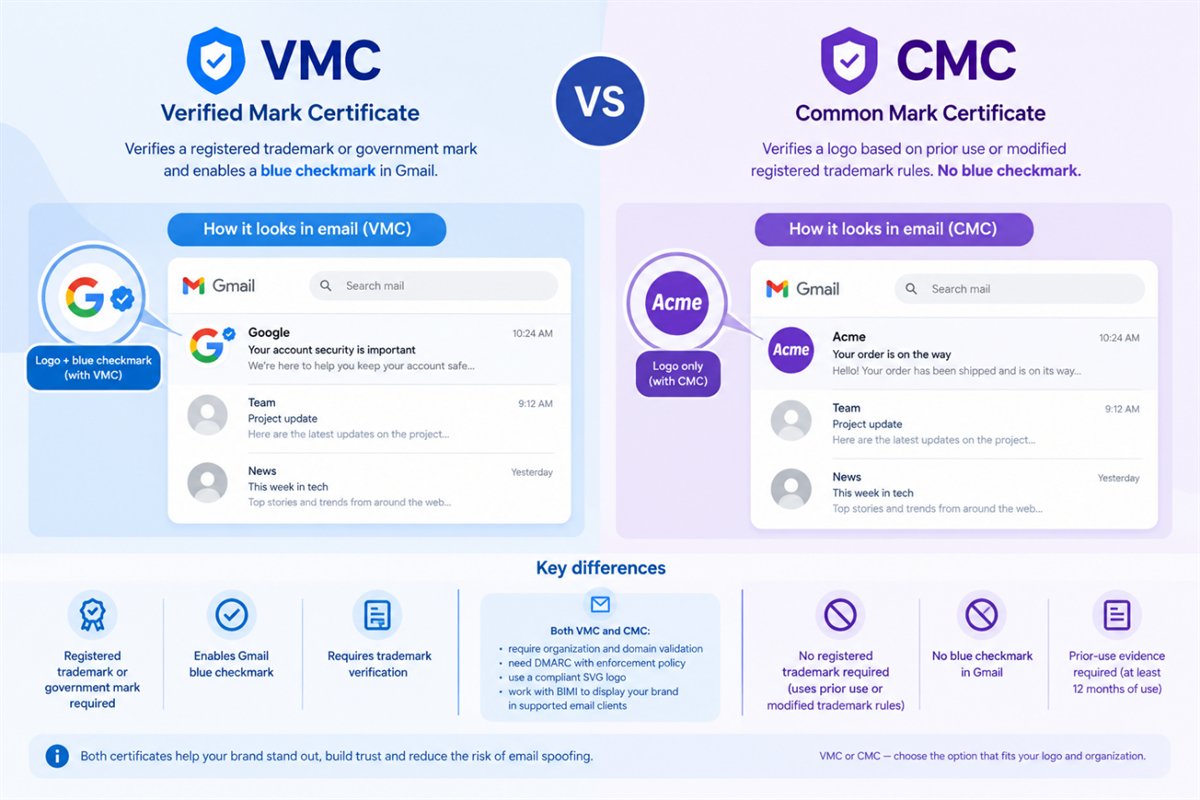
This guide explains the requirements for VMC and CMC issuance, including organization and domain validation, DMARC compliance, logo preparation, trademark or prior-use verification, and applicant identity verification.
-
-
*
Step 1. Organization and Domain Validation
Both VMC and CMC applications require organization validation based on Extended Validation (EV) requirements, along with additional checks specific to mark certificates.
DigiCert verifies the organization's legal existence and confirms that the applicant is authorized to represent it. The validation process may include checks of:
- Legal business name and registration information.
- Physical business address.
- Business telephone number and operational existence.
- The identity and authority of the relevant organizational contacts.
- Domain control for the domain associated with the certificate request.
The information normally is verified using the government and the third-party databases. The applicant may need to provide supporting documents or respond to questions from the validation team if the information available to DigiCert is insufficient.
Domain Control Validation (DCV)
The applicant must demonstrate control over the domain used for the VMC or CMC. DigiCert provides instructions for completing domain validation as part of the order process. The validation is performed using the E-mail, DNS or File-Based domain verification methods.
Note: Domain validation is separate from DMARC compliance. Completing DCV confirms control over the domain, while DMARC establishes an email authentication policy.
-
*
Step 2. DMARC Compliance
DMARC (Domain-based Message Authentication, Reporting, and Conformance) is an email authentication protocol that helps protect domains against spoofing and unauthorized email use.
A VMC or CMC applicant must publish a DMARC record with an enforcement policy. DigiCert identifies the following policies as qualifying for VMC issuance:
- p=quarantine
- p=reject
A monitoring-only policy of p=none does not meet this requirement.
How to Check DMARC
DMARC is published as a DNS TXT record at the _dmarc subdomain of the relevant domain. For example, the record for example.com is published at:
_dmarc.example.com
An illustrative DMARC record is:
v=DMARC1; p=quarantine; rua=mailto:dmarc-reports@example.com
This is an example, not a complete configuration for every organization. The reporting address and policy should reflect your email environment.
Before enforcing DMARC, identify the legitimate systems that send email on behalf of your domain and configure SPF and DKIM appropriately. An enforcement policy can affect legitimate messages if your email sources are not configured correctly.
For additional instructions, see DigiCert's guide to setting up DMARC record.
-
*
Step 3. Logo Validation and SVG Requirements
The logo submitted for a VMC or CMC must comply with the BIMI requirements and the certificate authority's validation rules.
A regular SVG file exported from a graphics application may not be compliant. The logo must use the SVG Tiny Portable/Secure profile, commonly referred to as SVG Tiny PS or SVG-P/S.
Before submitting the logo, check that:
- The file is in SVG format.
- The SVG complies with the required SVG Tiny PS profile.
- The artwork is suitable for display in a compact email avatar.
- The file does not contain unsupported elements or external dependencies.
- The logo meets the applicable trademark or prior-use requirements for the certificate type.
A file extension of .svg alone does not guarantee that the logo meets the specification.
DigiCert reviews the submitted logo and may request corrections if the file does not meet the requirements. For a VMC, the logo must also match the qualifying registered trademark or government mark.
Preparing the Logo
Use the following resources for guidance:
A conversion tool can help prepare the file, but it does not replace the CA's logo validation.
-
*
Step 4 for VMC. Trademark Verification (VMC ONLY)
A VMC requires a qualifying registered trademark or an eligible government mark. DigiCert verifies the registration details and confirms that the submitted logo corresponds to the official mark.
Before applying, prepare:
- The trademark registration number.
- The name of the trademark office that issued the registration.
- The logo file that will be submitted with the certificate request.
- Any additional documentation requested by DigiCert.
The trademark must be registered with an accepted trademark office or otherwise qualify under the applicable government-mark rules. Not every trademark registration automatically qualifies, so check DigiCert's current list of accepted offices and requirements before ordering.
The submitted logo must match the registered mark. Changes to the artwork that make it materially different from the official registration can cause validation to fail.
For the current requirements and accepted jurisdictions, see the list available in DigiCert official resource.
-
*
Step 4 for CMC. Prior-Use Verification (CMC ONLY)
A CMC can be an option when a logo does not qualify for a VMC because it is not registered as a trademark. However, the logo must meet DigiCert's CMC eligibility rules.
For the prior-use option, the logo must have been used for at least 12 months before the mark verification date on a domain controlled by the organization. DigiCert may use archived website records, including the Internet Archive, to verify that history.
Prepare evidence showing:
- The logo being used by the organization.
- The domain on which it was used.
- That the use extends back at least 12 months.
- That the logo is associated with the organization applying for the certificate.
-
*
Step 5. Identity Verification of the Applicant
The person submitting the VMC or CMC request must have their identity verified and be authorized to represent the organization.
DigiCert currently documents two identity verification methods:
- Video verification: The applicant meets with a DigiCert Validation Specialist online and presents a valid government-issued photo ID. The specialist may perform a brief liveness check.
- Notarized identity declaration: The applicant completes the identity declaration process using a DigiCert-approved notary or lawyer, following the instructions supplied by the CA.
The exact steps and documents required depend on the selected method. Wait for DigiCert's instructions before submitting identity documents, and use the secure upload method provided by the validation team.
For video verification, prepare a valid photo ID, ensure you have a reliable internet connection, and join from a well-lit location. The instructions will be provided by the validation team.
-
*
Step 6. Final Approval and Certificate Issuance
After the organization, domain, logo, trademark or prior use, and applicant identity have been validated, the order can proceed to final approval.
DigiCert may send an approval request to the organization's validated EV Approver. The authorized contact must complete any required approval step before issuance.
Validation time varies according to the organization's readiness and how quickly the applicant completes the requested steps. Ensure that the relevant contacts monitor their email and respond promptly to requests from the CA.
-