
How Microsoft OS Reputation Management Works to Protect Against Malicious Software
-
Microsoft Windows uses multiple layers of security to help protect users against malicious websites, unsafe downloads, suspicious applications, and unauthorized system changes.
One important part of this protection is Microsoft's reputation-based security technology, which evaluates whether a website, file, or application is known to be trustworthy, potentially harmful, or unfamiliar.
However, reputation management is not a single security feature. Windows combines Microsoft Defender SmartScreen, digital signatures, cloud-based threat intelligence, Microsoft Defender Antivirus, and other protection mechanisms to assess potential risks.
Understanding how these technologies work is particularly important for software developers and publishers who distribute applications using Code Signing certificates.
-
-
*
1. Microsoft Defender SmartScreen
Microsoft Defender SmartScreen is a reputation-based security feature designed to help protect users against phishing websites, malicious downloads, and potentially unsafe applications.
SmartScreen evaluates different types of reputation information depending on whether a user is visiting a website or downloading and running software.
Website reputation
When users access websites, SmartScreen can check whether the destination is associated with known phishing attempts, malware distribution, or other suspicious activities.
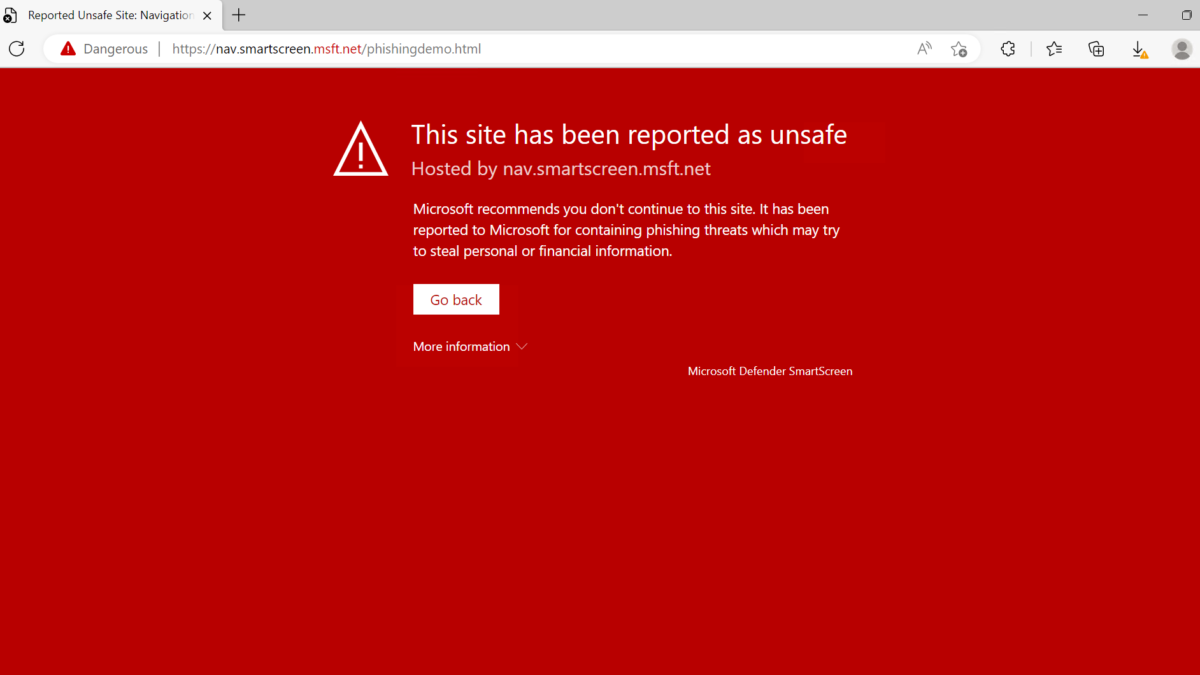
If a website is identified as potentially dangerous, Microsoft Edge may display a warning to help prevent users from exposing sensitive information or downloading harmful content.
Application reputation
For downloaded applications, SmartScreen evaluates factors such as:
- File reputation: Whether the specific file has an established history of safe downloads and execution.
- Publisher reputation: Whether the application is digitally signed and the publisher has established a trustworthy reputation.
- Security intelligence: Whether Microsoft has identified suspicious or malicious activity associated with the file.
For example, when a user downloads a newly released executable file, SmartScreen may display a "Windows protected your PC" warning if the application has not yet established sufficient reputation.
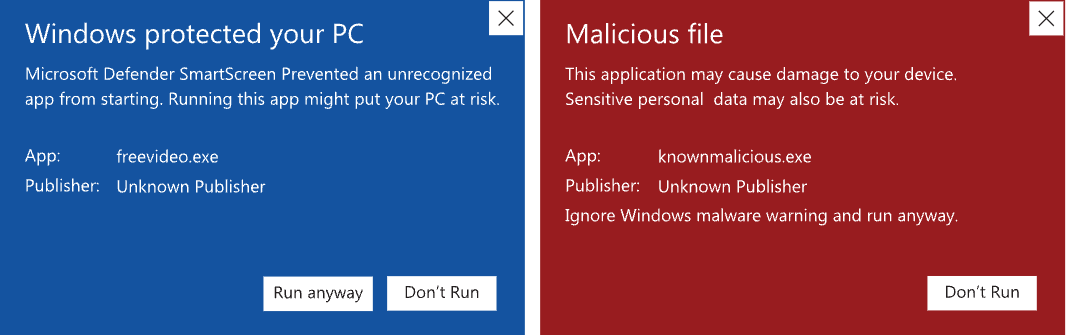
Kindly note: a SmartScreen warning does not necessarily mean that the application contains malware. It may simply indicate that Microsoft does not yet have enough information to classify the application as trusted.
-
*
2. Code Signing and Digital Signatures
Code Signing certificates help software publishers establish their identity and protect the integrity of their applications.
When a developer digitally signs software, the signature provides two important assurances:
- Publisher identity: The signature identifies the verified publisher associated with the certificate.
- File integrity: The signature allows Windows to detect whether the signed content has been modified after signing.
Windows can verify the digital signature and certificate chain to determine whether the signature is valid and whether the certificate is trusted for code signing.
However, a valid digital signature does not guarantee that an application is safe or that Microsoft SmartScreen will allow it without warnings.
Code Signing establishes authenticity and integrity. SmartScreen separately evaluates reputation and security-related signals.
OV vs. EV Code Signing: Does EV Still Bypass SmartScreen?
Historically, Extended Validation (EV) Code Signing certificates offered an advantage because EV-signed applications could receive immediate positive SmartScreen reputation.
This is no longer the case.
Microsoft removed the automatic SmartScreen reputation advantage previously associated with EV Code Signing in 2024.
Today, applications signed with OV and EV Code Signing certificates are evaluated using the same SmartScreen reputation principles.
Feature OV Code Signing EV Code Signing Verified publisher identity Yes Yes Digital signature and file integrity Yes Yes More extensive organization validation No Yes Automatic SmartScreen bypass No No Reputation may need to develop over time Yes Yes An EV certificate can still be relevant where additional identity verification is required, but purchasing EV Code Signing solely to eliminate SmartScreen warnings is not an effective strategy.
Software publishers should instead focus on consistent signing practices, secure software distribution, and building a positive reputation over time.
-
*
3. Cloud-Based Protection and Threat Intelligence
Microsoft uses cloud-based security intelligence to identify emerging threats and evaluate potentially suspicious applications.
When a file is encountered, supported Windows security components may consult Microsoft's cloud services to obtain additional information about the file or its behavior.
These services can use signals such as:
- Previously identified malware and potentially unwanted applications.
- File characteristics and known threat indicators.
- Reputation and prevalence information.
- Suspicious behaviors and patterns identified across Microsoft's security ecosystem.
Cloud-based protection helps Microsoft respond to newly emerging threats more quickly than relying exclusively on locally stored security definitions.
However, the exact checks performed depend on the Windows security feature, its configuration, and applicable organizational policies.
-
*
4. Microsoft Defender Antivirus and Machine Learning
Microsoft Defender Antivirus is a separate security component that helps detect, block, and remove malicious software.
While SmartScreen focuses heavily on reputation-based protection against unsafe websites and downloaded applications, Defender Antivirus evaluates potential malware using several detection methods.
These include:
- Known malware signatures.
- Behavioral analysis.
- Machine learning and heuristic detection.
- Cloud-delivered protection.
- Real-time monitoring of suspicious activity.
For example, an application may have a valid Code Signing signature but still be detected as malicious if its behavior resembles ransomware, credential theft, or another threat.
A digital signature identifies the publisher and helps establish file integrity; it does not exempt software from antivirus scanning.
This distinction is essential for developers: Code Signing and malware protection serve different purposes and complement each other.
-
*
5. Microsoft Threat Intelligence Reputation Scoring
Microsoft Threat Intelligence uses reputation data to help security teams assess whether an entity is associated with malicious or suspicious infrastructure.
Microsoft assigns a reputation score ranging from 0 to 100. The score is derived from proprietary threat intelligence data and machine-learning detection rules. These rules evaluate multiple signals and relationships rather than relying on a single indicator.
The reputation system can be used to evaluate entities such as IP addresses, domains, URLs, and files within Microsoft Defender threat intelligence experiences.
The reputation categories are:
Score Category Description 75–100 Malicious The entity has confirmed associations with known malicious infrastructure and matches detection rules indicating suspicious activity. 50–74 Suspicious The entity is likely associated with suspicious infrastructure based on multiple machine-learning rule matches. 25–49 Neutral The entity matches some detection rules, but the available signals are not sufficient to classify it as suspicious or malicious. 0–24 Unknown Microsoft has identified few or no matching reputation rules for the entity. Microsoft's reputation models may consider factors such as known malicious associations, infrastructure relationships, hosting characteristics, domain registration information, name servers, and TLS certificate characteristics.
These factors are evaluated collectively. A single signal does not necessarily mean that an entity is malicious.
User and organizational reports can also contribute to Microsoft's broader threat intelligence. However, the numerical reputation score should not be interpreted as a direct measurement of user feedback.
It is also important to distinguish this Microsoft Threat Intelligence reputation score from Microsoft Defender SmartScreen application reputation. Although both are part of Microsoft's broader security ecosystem and may use overlapping threat intelligence, the 0–100 score should not be treated as a publicly visible SmartScreen score that determines whether a signed Windows application will display a SmartScreen warning.
-
*
6. File and URL Reputation
File reputation and URL reputation are related but distinct aspects of Microsoft's security ecosystem.
File reputation helps assess whether a downloaded application is known and trusted.
A newly released executable may initially have limited reputation because Microsoft has not yet observed sufficient download history or other positive signals.
Over time, legitimate software distributed consistently and without malicious behavior may develop a stronger reputation.
URL reputation helps identify websites associated with phishing, malware distribution, or other threats.
For example, a website that distributes malicious software may trigger a browser warning even if some files hosted elsewhere by the same publisher are digitally signed.
Likewise, a reputable download website does not automatically establish a positive reputation for every new executable distributed through it.
These evaluations are related, but they should not be treated as interchangeable.
-
*
7. Protection Against New or Unfamiliar Applications
One of the most common challenges for software developers is distributing a legitimate application that has not yet established a positive reputation with Microsoft.
Even when the application is properly signed, SmartScreen may initially identify it as an unfamiliar application.
This is particularly relevant for:
- Newly established software publishers.
- Applications with relatively few downloads.
- Software distributed to a small customer base.
- Newly released executable files.
- Applications signed using a new certificate or signing identity.
**Best practices to establish and maintain a positive reputation:
Sign all applicable application binaries.** Use a trusted Code Signing certificate to sign installers, executables, and other supported components.
Maintain a consistent publisher identity. Consistent signing practices can help Microsoft associate software releases with an established publisher.
Protect the private signing key. Use secure, compliant key storage and prevent unauthorized access.
Distribute software through trustworthy channels. Avoid compromised download locations and ensure that signed files are not modified after signing.
Use trusted timestamping. Timestamping helps preserve the validity of properly created signatures after the signing certificate expires, subject to applicable trust and revocation conditions.
Monitor security warnings. If a legitimate application is incorrectly classified as malicious or unsafe, developers can use Microsoft's applicable submission and review processes.
There is no guaranteed number of downloads or fixed period after which SmartScreen warnings will disappear.
The final reputation decision remains under Microsoft's control.
-
*
8. Smart App Control in Windows 11
Smart App Control is another Windows security feature that helps protect devices against malicious, potentially unwanted, and untrusted applications.
Although it uses Microsoft's security intelligence, Smart App Control is not the same as Microsoft Defender SmartScreen.
Smart App Control evaluates applications before they run.
If Microsoft's cloud-based security service can confidently determine that an application is safe, Smart App Control can allow it.
If the service cannot confidently classify the application, Smart App Control can examine whether the application has a valid digital signature from a trusted publisher.
Applications that are unsigned, improperly signed, or otherwise considered untrusted may be blocked.
For software developers, this makes proper Code Signing especially important.
However, a valid signature does not override an explicit malicious or potentially unwanted application classification, and signing alone cannot guarantee that every application will be allowed.
Developers should test their applications on supported Windows 11 environments with Smart App Control enabled, particularly when their applications contain multiple executable components.
-
*
9. Controlled Folder Access
Controlled Folder Access is a Microsoft Defender security feature designed primarily to protect important folders against unauthorized modifications, including ransomware-related activity.
When enabled, it monitors attempts by applications to modify protected folders.
Applications that are not recognized as trusted or explicitly allowed may be prevented from changing files in those locations.
Protected locations can include commonly used folders such as Documents, Pictures, and other folders configured by the user or administrator.
For example, if an unknown application attempts to encrypt files inside a protected folder, Controlled Folder Access may block the operation.
This feature operates independently of SmartScreen application reputation and should not be confused with Code Signing validation.
A digitally signed application may still encounter restrictions if its behavior conflicts with applicable security policies.
-
*
Conclusion
Microsoft's Windows security ecosystem uses several complementary technologies to help protect users against malicious software, unsafe downloads, phishing websites, and unauthorized system changes.
Microsoft Defender SmartScreen evaluates reputation, Code Signing verifies publisher identity and file integrity, Defender Antivirus detects potential malware, and features such as Smart App Control and Controlled Folder Access provide additional layers of protection.
For software developers, the key takeaway is that Code Signing is essential for establishing authenticity and integrity, but it does not automatically establish positive Microsoft reputation.
Since EV Code Signing certificates no longer provide an automatic SmartScreen bypass, both OV and EV certificate holders must follow secure software development, signing, and distribution practices.
By combining trusted digital signatures with consistent publishing practices and ongoing security monitoring, developers can improve user confidence and reduce unnecessary security warnings while maintaining stronger protection for their applications.
-