Why You Should Sign Your Code and Verify It Before Publishing
-
A code signing certificate shows users who published your software and proves it hasn't been changed. Here's why signing matters, what you need to get started, and how to check your signature before you release.
-
-
*
Why Sign Your Code
When someone downloads and runs unsigned software, Windows shows the publisher as Unknown and warns the user before letting the program start. Many users stop right there.
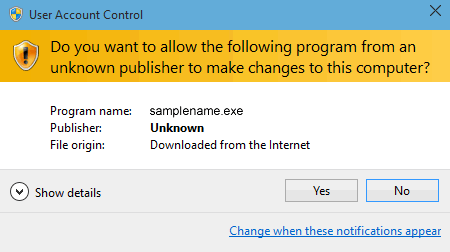
Figure 1: Unsigned software. Windows shows the publisher as Unknown.
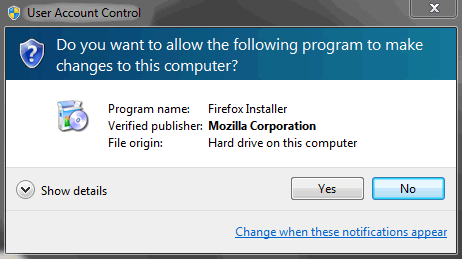
Figure 2: Signed software. Windows shows the verified publisher name.
Signing your code changes that:
- Your name appears as the publisher. Instead of "Unknown publisher", users see your verified company or personal name.
- Changes are detected. If anyone modifies the file after you sign it, even by a single byte, the signature breaks and the system warns the user.
- Some platforms require it. Kernel-mode Windows drivers can't be installed without a signature, PowerShell can be set to run only signed scripts, and many organizations block unsigned Office macros.
- Reputation builds on your identity. Microsoft SmartScreen links reputation to your signing certificate, so every release you sign with it adds to your track record.
Important: Signing doesn't remove SmartScreen warnings right away. New software still needs time to build reputation, whether it's signed with an OV or EV certificate. See EV Code Signing vs. OV Code Signing .
-
*
What You Need
- A code signing certificate issued by a trusted certificate authority, either OV or EV.
- Secure hardware for the private key. Since June 2023, the key must be generated and stored on a USB token, an HSM, or a cloud HSM. It can't be downloaded as a file. See Code Signing 2023 Industry Changes.
- A signing tool for your platform, such as SignTool for Windows or jarsigner for Java.
- A timestamp server, so your signature stays valid after the certificate expires. See Timestamping: Why Digital Signatures Need Timestamps .
-
*
Where You Need a Code Signing Certificate
A certificate from a public certificate authority is what you need to sign:
- Windows executables, installers, and libraries (.exe, .msi, .dll)
- Windows drivers
- PowerShell scripts
- Java applications (.jar)
- Office VBA macros
Important: Apple and Google use their own signing systems. Apps for iOS and macOS are signed with certificates issued by Apple through the Apple Developer Program, and Android apps are signed with the developer's own key and Google Play App Signing. A code signing certificate from a public CA isn't used for these platforms.
-
*
How to Sign
The exact steps depend on your platform and tool. On Windows, a typical SignTool command with a timestamp looks like this:
signtool sign /fd sha256 /tr http://timestamp.digicert.com /td sha256 /a MyApp.exe
For a step-by-step guide, see How to Sign an EXE File with a Code Signing Certificate .
-
*
Verify Before You Publish
A quick check before release confirms that the signature is valid, the right certificate was used, and the timestamp is in place.
On Windows, right-click the file, choose Properties, and open the Digital Signatures tab. Select the signature and click Details: you should see "This digital signature is OK" and a timestamp. From the command line, use SignTool:
signtool verify /pa /v MyApp.exe
For Java, run jarsigner. The output should say "jar verified" and show your certificate details:
jarsigner -verify -verbose -certs MyApp.jar
Tip: Check the file the way your users will get it: download it from your website or store and verify that copy. Upload tools, installers, and CDNs can sometimes change files, which breaks the signature.
-