
Complete Guide to Anti-Phishing Solutions for Modern Enterprises
-
Email remains one of the primary channels used by cybercriminals to target organizations. Phishing campaigns have evolved far beyond poorly written messages and obviously fake login pages. Attackers now impersonate executives, compromise legitimate mailboxes, hijack existing conversations, and create convincing phishing pages that closely resemble trusted services.
Generative AI has made these attacks even easier to personalize. Messages can be adapted to a recipient's role, company, language, and normal communication style, making suspicious emails increasingly difficult to identify at first glance.
Because email remains essential for everyday business communication, organizations need more than a basic spam filter. Effective phishing prevention requires a combination of technical controls, email authentication, identity protection, employee awareness, and incident response.
-
-
*
Types of Email Phishing Attacks
Although phishing campaigns use different techniques, most rely on the same principle: creating enough trust, urgency, or pressure to make someone act without carefully verifying the request.
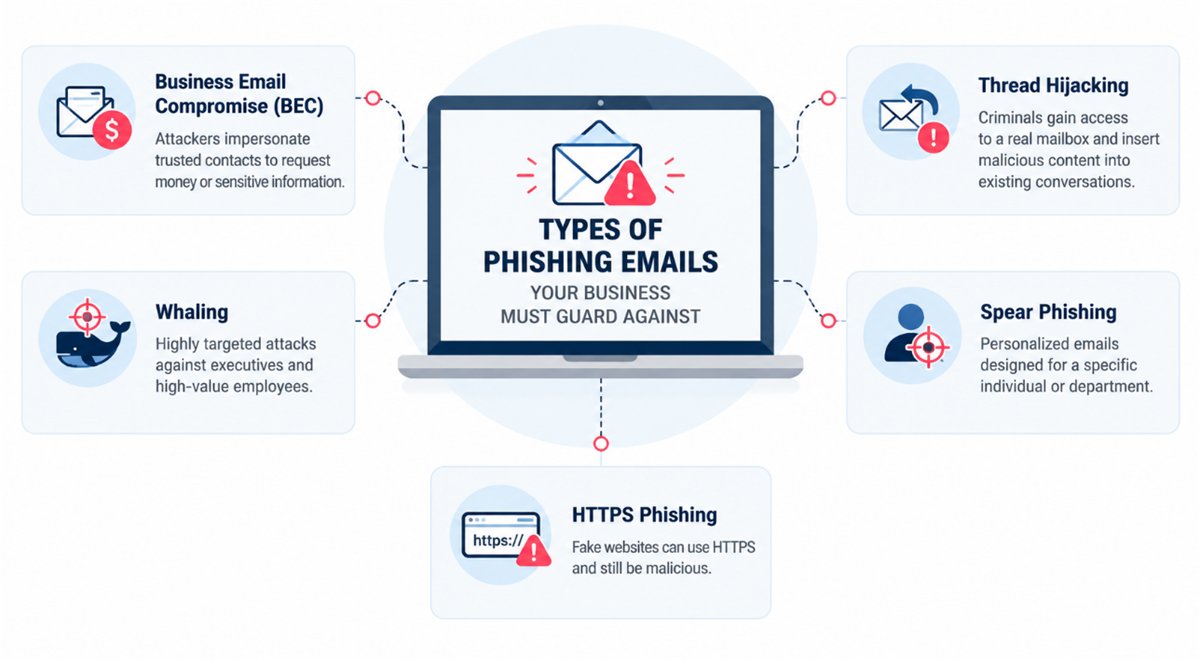
Business Email Compromise (BEC)
Business Email Compromise occurs when criminals impersonate or compromise a trusted business account to manipulate employees into transferring money, changing payment details, or sharing sensitive information.
BEC can be particularly difficult to detect because the message may contain no malware or malicious links.
Example: An attacker impersonates a company executive and asks the finance department to urgently transfer funds to a new bank account.
Defense Tip: Use strong MFA, require independent verification for payment changes, apply least-privilege access, and train employees to verify unusual financial requests.
Where possible, organizations should prioritize phishing-resistant MFA for high-risk accounts rather than relying exclusively on passwords or traditional push notifications. CISA recommends phishing-resistant MFA as a stronger defense against phishing-related account compromise.
Thread Hijacking
In thread hijacking attacks, criminals gain access to a legitimate mailbox and insert malicious content into an existing email conversation.
Because the recipient already recognizes the sender and conversation, the fraudulent message can appear highly credible.
Example: An attacker compromises a supplier's mailbox and replies to an existing invoice conversation with modified payment instructions or a malicious attachment.
Defense Tip: Monitor unusual mailbox activity, use MFA, scan suspicious attachments and URLs, and independently verify unexpected changes to payments or account details.
HTTPS Phishing
A phishing website can use HTTPS and still be malicious. Attackers frequently obtain valid TLS certificates for domains they control and use them to create convincing copies of login pages.
The browser padlock indicates that the connection is encrypted — it does not prove that the website itself is legitimate.
Example: An employee receives an account-security warning that links to a convincing HTTPS-protected copy of a Microsoft 365 or corporate login page.
Defense Tip: Use URL inspection and domain reputation tools, and train users to verify the actual domain rather than relying on the HTTPS indicator alone.
Whaling
Whaling is a specialized form of spear phishing targeting senior executives, board members, finance leaders, and other high-value employees.
Messages are often disguised as confidential legal, financial, acquisition, or executive communications.
Defense Tip: Provide targeted awareness training for executives, apply stronger authentication to privileged accounts, and require independent verification of sensitive requests.
Spear Phishing
Spear phishing targets a particular person or department using information gathered from public sources, stolen data, or previous compromises.
A message may mention the employee's real job, colleagues, projects, suppliers, or business processes, making it considerably more convincing than generic phishing.
Defense Tip: Combine advanced email filtering and behavioral analysis with regular security awareness training and strong identity protection.
-
*
Different Types of Anti-Phishing Solutions
No single technology can stop every phishing attack. A stronger approach uses several defensive layers so that if one control fails, another can still detect or contain the threat.
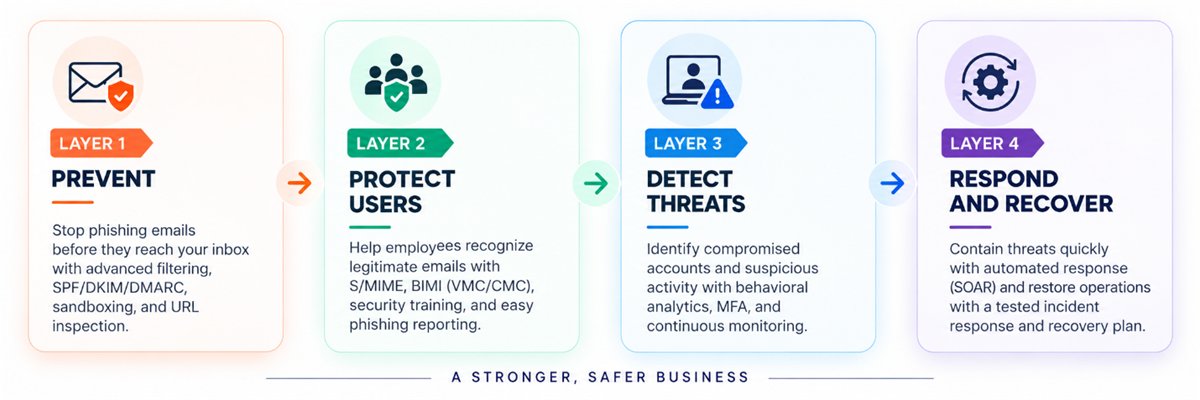
Layer 1: Prevent Phishing Emails from Reaching the Inbox
The first layer focuses on identifying malicious messages before users interact with them.
- Secure Email Gateway / Cloud Email Security: Inspects messages for spoofing, malicious attachments, suspicious URLs, impersonation, and other threats.
- Sandboxing: Opens suspicious attachments or content in an isolated environment to identify malicious behavior.
- URL Inspection: Analyzes links and can prevent users from accessing known or newly detected phishing destinations.
- Brand and Image Recognition: Detects copied logos, fake login pages, QR-code phishing, and other visual impersonation techniques.
- AI-Based Detection: Uses behavioral and contextual analysis alongside traditional signatures and reputation systems to identify unusual messages.
- SPF, DKIM, and DMARC: Help authenticate legitimate email and reduce direct domain spoofing.
TLS (Transport Layer Security): should also be used to encrypt connections between mail systems, although it should not be confused with sender authentication.
Layer 2: Help Users Recognize Suspicious Messages
Technical filters will not catch every attack. Employees therefore remain an important part of the defense.
- S/MIME: Provides digital signing and optional end-to-end email encryption. Digital signatures can help recipients verify the sender and detect message modification.
- VMC and CMC: Verified Mark Certificates and Common Mark Certificates work with BIMI to display validated brand logos in supported email clients. Google currently supports both certificate types for BIMI, while Gmail's verified checkmark is associated with VMC.
- Security Awareness Training: Regular training and realistic phishing simulations teach employees to recognize suspicious requests and common social-engineering techniques.
- Phishing Reporting: A visible "Report Phish" option makes it easier for employees to escalate suspicious messages to security teams.
These controls make legitimate communication easier to recognize while giving employees a clear procedure when something looks suspicious.
Layer 3: Detect Account Compromise
Even strong email filtering cannot guarantee that credentials will never be stolen.
- Behavioral Analytics: Detects unusual logins, unexpected mailbox activity, abnormal sending patterns, suspicious forwarding rules, and other deviations from normal behavior.
- Multi-Factor Authentication: Adds another authentication requirement when passwords are compromised. Phishing-resistant authentication methods provide stronger protection against credential-based attacks.
This layer is particularly important because a compromised legitimate mailbox can be used for BEC, thread hijacking, and highly convincing internal phishing.
Layer 4: Respond and Recover
If an attack succeeds, fast containment can significantly reduce its impact.
- SOAR: Security Orchestration, Automation, and Response platforms act like a control tower for your security operations center (SOC). These can connect security systems and automate actions such as disabling accounts, removing malicious messages, blocking domains, and escalating incidents.
- Cyber Recovery: Tested backups, recovery procedures, identity restoration, and incident-response plans help organizations restore critical services after ransomware or other serious compromises.
The objective is not only to detect phishing, but also to minimize the damage when preventive controls fail.
-
*
How to Evaluate Anti-Phishing Solutions
Selecting an anti-phishing platform should be based on the organization's actual risks rather than the longest feature list.
- Define Your Main Risks
Start by identifying the attacks you experience most frequently. A finance department targeted by BEC has different priorities from an organization struggling with credential phishing or malicious attachments.
- Establish Measurable Criteria
Useful evaluation metrics include:
- Detection accuracy
- False-positive rate
- Response time
- User reporting rate
- Integration capabilities
These measurements provide a more objective way to compare solutions.
- Check Integration with Your Existing Environment
Choose technology that works effectively with your current email, identity, endpoint, SIEM, and security infrastructure.
A product that requires extensive manual processes or creates another isolated security system may add unnecessary operational complexity.
- Run a Proof of Concept
Before making a long-term commitment, test shortlisted solutions against realistic phishing scenarios for several weeks.
Include different attack types such as executive impersonation, credential phishing, suspicious attachments, lookalike domains, and thread hijacking.
- Ask Employees and Security Teams for Feedback
Security controls must also be usable.
Check whether warning banners are clear, phishing reporting is easy, false positives interfere with normal work, and security analysts receive enough information to investigate incidents efficiently.
- Consider Total Cost of Ownership
Look beyond the license price. Deployment, administration, employee training, support, integrations, and analyst workload all contribute to the actual cost of an anti-phishing platform.
- Review Vendor Support and Development
Phishing tactics continue to change, particularly with AI-generated content, account takeover, QR-code phishing, and sophisticated impersonation.
Evaluate how frequently the platform is updated, what support is available, and whether its development roadmap addresses emerging attack techniques.
-
*
Real-World Example: Business Email Compromise
A well-known BEC case demonstrates how damaging email-based deception can become without sophisticated malware.
Between 2013 and 2015, Evaldas Rimasauskas and his associates impersonated a legitimate hardware manufacturer and used fraudulent invoices, contracts, and emails to convince two major U.S. technology companies to transfer more than $100 million to bank accounts controlled by the attackers.
The scheme demonstrates an important characteristic of BEC: attackers do not always need to compromise infrastructure directly. Sometimes they only need to convincingly imitate an existing business relationship and manipulate normal payment procedures.
Organizations can reduce this risk by combining email security with operational controls such as independent verification of bank-account changes, dual approval for large payments, MFA, and strict access controls.
-
*
Building an Effective Anti-Phishing Strategy
An effective phishing prevention strategy combines technology, authentication, employee awareness, and incident response rather than depending on a single defensive tool.
A practical approach should include:
- Strengthen email authentication: Configure SPF, DKIM, and DMARC correctly to reduce domain spoofing.
- Protect user accounts: Enable strong MFA, particularly for administrators, executives, finance teams, and other high-risk users.
- Improve email filtering: Use modern tools capable of analyzing links, attachments, sender behavior, and impersonation attempts.
- Train employees: Run realistic phishing simulations and teach employees how to verify unusual requests.
- Make reporting simple: Give users an easy way to report suspicious messages.
- Protect sensitive workflows: Require independent verification for payment changes and other high-risk transactions.
- Review incidents regularly: Use attempted and successful attacks to improve detection rules, training, and response procedures.
-
*
Conclusion
Phishing attacks have become more convincing, targeted, and difficult to identify. Attackers can impersonate executives, compromise legitimate accounts, hijack existing conversations, and create professional-looking phishing sites that use HTTPS.
That makes a layered security model essential.
Email filtering, SPF, DKIM, DMARC, S/MIME, VMC or CMC, MFA, employee awareness, behavioral monitoring, and incident response all address different parts of the problem. Used together, these controls can significantly reduce the likelihood that a single deceptive email develops into a serious security incident.
The objective is not to find one tool capable of stopping every phishing attempt. It is to build an email-security environment in which attacks are more likely to be prevented, detected, reported, and contained before they can cause significant damage.
-