
AutoInstall SSL Advanced Configuration Options
-
AutoInstall SSL provides a set of advanced configuration settings that allow you to fine-tune how the system handles SSL certificate automation on your server.
In most cases, the default configuration is recommended and works without any changes. However, advanced users can adjust specific parameters depending on their environment and operational requirements.
Important: Changing advanced settings may affect certificate issuance, renewal, and installation behavior. Modify them only if you fully understand the impact.
-
-
*
How to Access Configuration Options
To modify AutoInstall SSL settings on your server, run the agent command:
Windows:
AutoInstallSSL.exeLinux:
sudo runautoinstallssl.sh
From the interactive menu, select Option 4 "Settings & Credentials" → then select Manage configuration
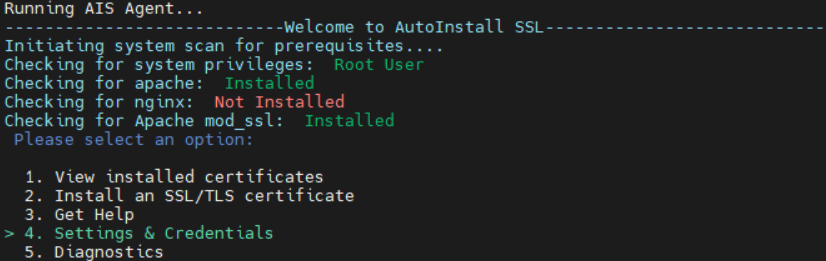
This will open the configuration panel where all advanced settings can be adjusted.
-
*
Available Configuration Parameters
Renewal Days
Defines how many days before expiration AutoInstall SSL should attempt to renew and install a new certificate.
- Default / Recommended: 28 days
Reissue Days
Used for multi-year certificates. Specifies how many days before expiration the system should reissue the certificate.
- Default / Recommended: 28 days
Auto Reissue Days
Enables periodic automatic reissuance of certificates even if they are not close to expiration.
Supported values:
- 0 – disabled (recommended)
- 30
- 60
- 90
- 120
In most cases, this option should remain disabled unless specifically required.
Auto Update
Controls whether the AutoInstall SSL agent automatically updates itself when a new version is available.
- Recommended setting: Yes (meaning Enabled)
Keeping the agent up to date ensures compatibility with the latest SSL/TLS requirements and prevents potential renewal failures caused by outdated functionality.
Disabling updates may result in compatibility issues over time, especially when CA validation or protocol requirements change.
-
*
Best Practices
- Keep Renewal Days set to 28 unless you have a specific requirement
- Avoid enabling Auto Reissue Days unless instructed by support
- Always keep Auto Update enabled to ensure long-term stability
- Do not modify advanced settings without understanding the impact on the certificate lifecycle process
-